Signing in without a password
Passkeys explained by Ilia Zavialov: the login that cannot be handed to the wrong site
English version for the United Kingdom.
Almost every account compromise still starts the same way. Somebody types a password into a page that looks right and belongs to someone else. Everything built on top of that, the one time codes, the push prompts, the security questions, exists to patch a design that hands a reusable secret to whoever asks convincingly enough. A passkey removes the secret from that path altogether. There is nothing to type, nothing to forward, nothing a convincing page can collect. By 2026 roughly five billion of them are in circulation, and the practical question has moved from whether this works to where it does not.

01What a passkey actually is
A passkey is a pair of mathematically linked keys. The private half is generated on your device and never leaves it. The public half goes to the service you are signing in to, and it is useless on its own: anyone who steals it gets a value that can verify a signature and cannot produce one.
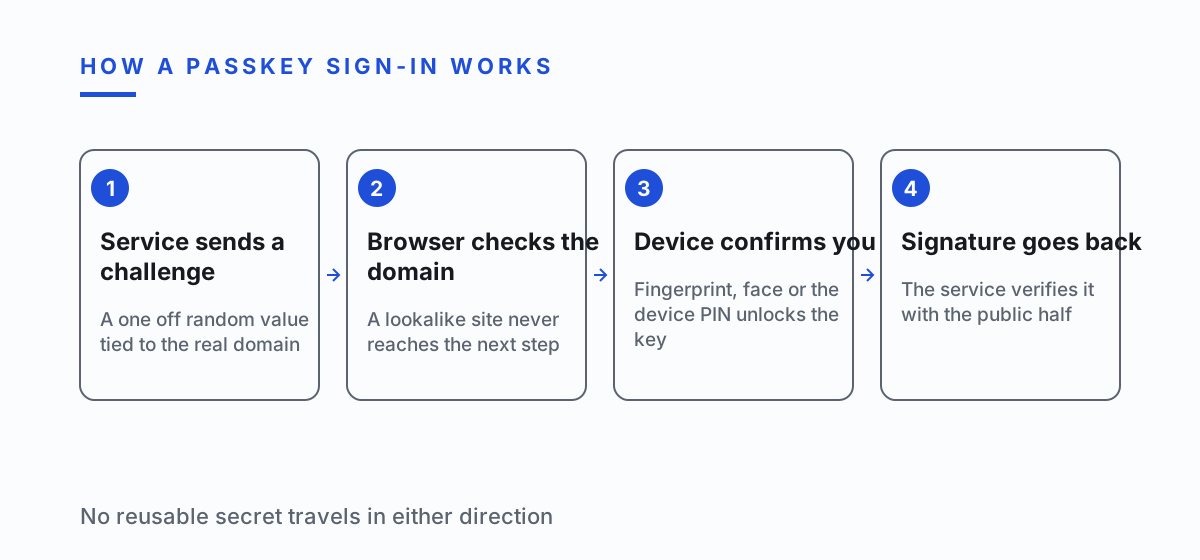
When you sign in, the service sends a challenge. Your device signs it with the private key after confirming that you are present, usually with a fingerprint, a face scan or the device PIN. The signature goes back. No shared secret crosses the wire in either direction, and nothing that travels is worth intercepting.
The biometric part confuses people, so it is worth being blunt about it. Your fingerprint is not sent anywhere. It unlocks the key on the device you are holding. The service never sees it and could not store it if it wanted to.
What people notice first is that the ceremony is shorter. Measured across organisations that have rolled passkeys out, sign-in succeeds about 93 percent of the time against 63 percent for the older methods, and the time spent signing in drops by roughly 73 percent.
02Why phishing stops working
This is the part that matters and the part that gets explained badly. A passkey is bound to the exact domain it was created for. The browser checks that binding before the device is even asked to sign anything. A page on a lookalike domain can be pixel perfect and it still gets nothing, because the key for the real site simply does not respond to a request coming from a different origin.
Compare that with a one time code. The code is a short reusable secret that arrives on your phone and can be read aloud, forwarded, typed into the wrong box or relayed in real time by a proxy sitting between you and the real service. Those relay kits are cheap and widely rented. Against a passkey they have nothing to relay.
CISA puts FIDO and WebAuthn in the category of phishing resistant multi factor authentication for exactly this reason. The resistance is structural. It does not depend on the person noticing that the address bar is slightly wrong, which is a demand no busy person reliably meets.
Worth saying plainly: this closes the phishing route, not every route. A device that is already infected is a different problem, and the section further down deals with it.
| Sign-in method | What a fake page can collect | What it is worth later |
|---|---|---|
| Password alone | The password as typed | Full access, and access anywhere the password was reused |
| Password and SMS code | The password and one code, usable for minutes | Access now, and the number becomes a target for a SIM swap |
| Password and app code | The password and one rotating code | Access now, nothing after the code expires |
| Push approval | An approval the person taps while confused | Access now, repeatable while the prompts keep arriving |
| Passkey | Nothing the fake page can use | Nothing, the key does not answer a request from another domain |
| Passkey with a password fallback | The fallback password | Full access, the passkey is bypassed rather than broken |
03How far the switch has gone
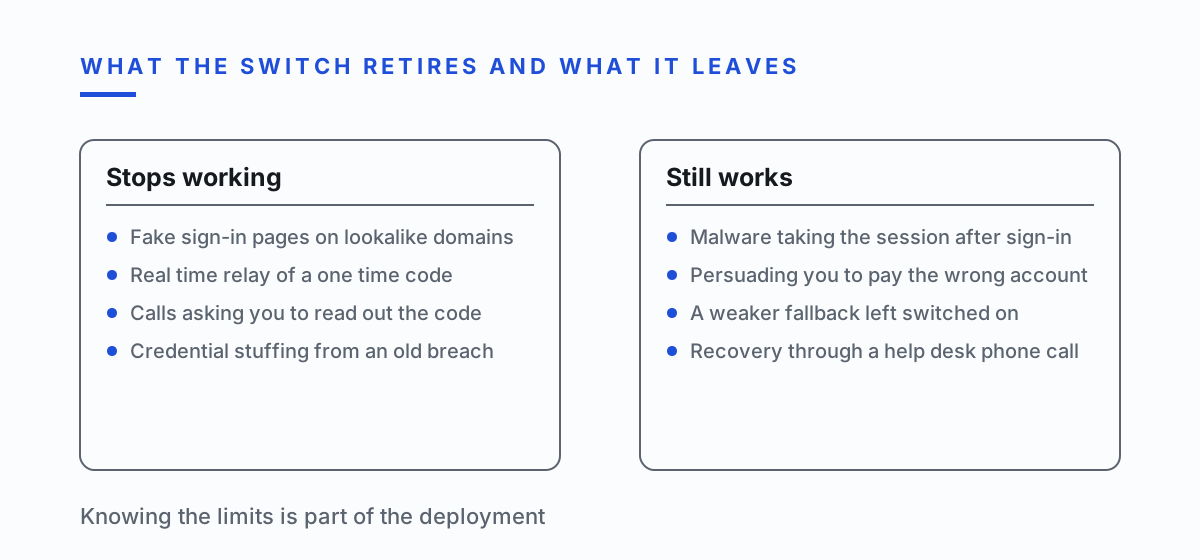
Awareness is no longer the bottleneck. Roughly 90 percent of people now know what a passkey is, and about 75 percent have enabled one on at least one account. The everyday sign-in at large consumer services has quietly changed underneath most users.
Inside companies the picture is less tidy. Around 68 percent of organisations are rolling passkeys out or running a pilot, and 82 percent say they want a fully passwordless environment. Only about 30 percent have made passkeys the primary way staff sign in, and 57 percent still run mainly on passwords or another method that can be phished.
That gap between intention and deployment is where most of the current damage lives. An organisation that has passkeys available but keeps a password fallback for convenience has bought very little: an attacker will simply aim at the fallback, which is what fallbacks are for.
The operational argument is easier to sell than the security one. Login related support tickets drop by around 81 percent after a rollout, and that number tends to move budgets faster than any threat briefing.
04What changes for one person
The first change is that password reuse stops mattering. Each passkey exists for one site and cannot be reused anywhere else even by you, so a breach at one service tells an attacker nothing about your accounts elsewhere.
The second is that you stop being the last line of defence. Nobody can talk you into reading out a passkey, because there is nothing to read. The whole category of phone calls that end with a request for the code you just received becomes impossible.
The third is less obvious. Passkeys sync through the platform account, which means signing in on a new phone works without a recovery ritual. That convenience is also the main thing to guard: the platform account becomes the crown jewel and deserves its own strong protection.
There is a fourth change that only shows up after a few months. You stop keeping a mental list of which password went where, and the low grade anxiety attached to that list goes with it. People underrate how much attention the old scheme consumed until it stops consuming it.
05What changes for a company
The gain is not only fewer incidents. Passkeys remove an entire class of support work: password resets, lockouts, and the awkward moment when a help desk has to decide whether the voice on the phone is really the finance director.
The rollout order matters more than the tooling. Start with the accounts that hold money or grant access to other accounts, not with the general population. An administrator account still on a password undoes a company wide deployment on its own.
The hard part is always the fallback. Recovery has to exist, and recovery is where attackers go once the front door is solid. A fallback that ends in a phone call to the help desk reintroduces the exact weakness the passkey removed, so recovery needs its own design rather than an afterthought.
Shared accounts deserve a separate decision. A passkey belongs to a person and a device, which is inconvenient for a mailbox three people use and healthy for the same reason. That inconvenience is usually a signal that the shared account should have been individual logins all along.
06Where passkeys do not help
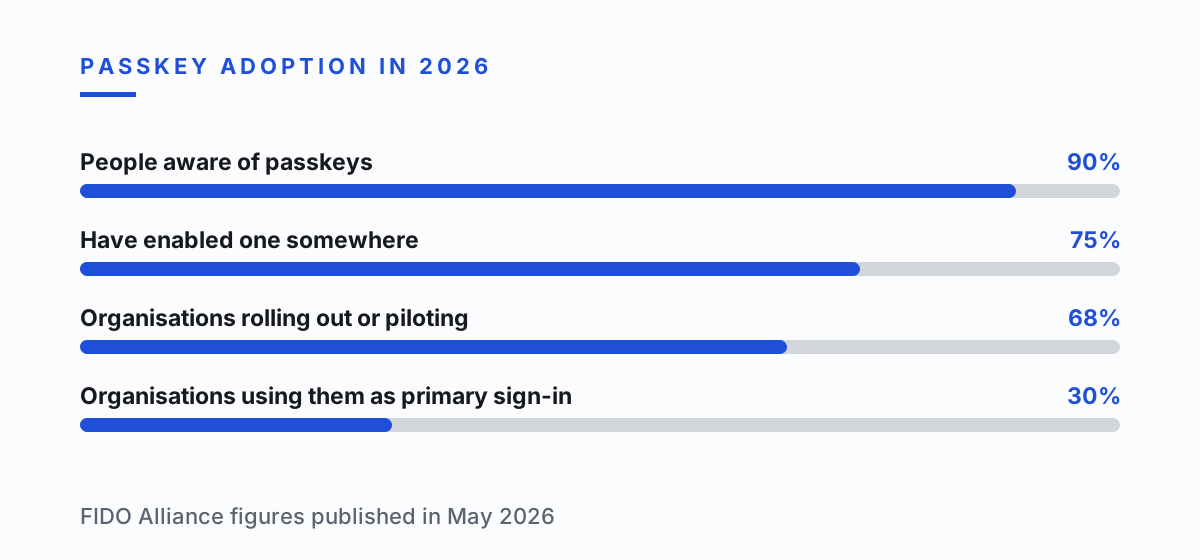
They do not help against a device that is already compromised. Software that has landed on the machine can take the live session after you have signed in, and the strength of the sign-in is irrelevant at that point. Stolen sessions turn up in the large majority of breach investigations for precisely this reason.
They do not help against being persuaded. If somebody convinces you to make a payment yourself, the payment is authorised properly and no authentication method will object. Fraud that runs through the victim rather than around them is untouched by any of this.
They do not help where the service still offers a weaker way in. A passkey plus an SMS code fallback is an SMS code account with extra steps, and attackers read the fallback menu as carefully as anyone.
Naming the limits is not a reason to skip the switch. It is a reason to know which attacks the switch actually retires, so nobody is surprised by the ones it leaves standing.
07Turning it on without regretting it
Protect the platform account first. Whatever account synchronises your keys, whether it belongs to the phone maker, the browser or a password manager, is now the thing that matters most. It gets the strongest protection you have and a recovery method you control.
Add a passkey to the accounts that can reset other accounts before anything else. Main email, then the platform account, then the bank. Fixing the account that can reset the others is worth more than fixing five ordinary ones.
Add a second device where the service allows it. One phone is a single point of failure, and the cheapest insurance against a broken screen is a passkey on a second device or a hardware key kept somewhere sensible.
Then remove what you replaced. A passkey sitting next to an unused password on the same account has not reduced anything, because the password is still a valid way in for whoever finds it. Where the service permits, turn the old method off rather than leaving it dormant.
08When the device is gone
Losing the phone is the question everybody asks, and the answer is duller than expected. Synced passkeys restore on a new device after you sign in to the platform account, so recovery is one step rather than a list of password resets.
Device bound keys, the kind on a hardware token, do not sync by design. That is the trade: better isolation, no automatic recovery. Anyone choosing that route registers a second token at the same time and keeps it somewhere other than the first.
A lost device is also a moment to revoke rather than only to restore. Remove the old device from the accounts it could reach, and end its active sessions. A key that no longer exists on a phone you no longer hold is still doing nothing useful in an account list.
The order is worth rehearsing before you need it, because the day you need it is the day you are least able to think clearly. Restore the platform account on the new device, check the device list on your main email, end anything you do not recognise, and only then work through the rest.
09Where this is going
The direction is settled and the timing is not. Large services keep moving passkeys from an option to the default, and the password box is drifting towards the position the fax number occupies on a business card: still printed, rarely used, faintly embarrassing.
The interesting fight over the next few years is about recovery, not about sign-in. Once the front door stops being pickable, pressure moves to the help desk, the account recovery form and the mobile carrier, and those are organisational problems rather than cryptographic ones.
For an individual the practical advice fits in a sentence. Turn passkeys on wherever they are offered, starting with the account that can reset the others, and turn the old method off once the new one works.
One caution for anyone about to declare the problem solved. Every security improvement that removes an attack also redirects the people who were running it, and they do not retire. The phishing operators who lose the credential harvest move to whatever still pays, which right now means the device itself, the recovery desk and the payment the victim makes willingly. Fixing the front door is worth doing and it changes where you have to keep watching.
10Questions and answers
Is a passkey stored on the device or in the cloud?
Both arrangements exist. Synced passkeys live in the platform account and appear on your other devices, which makes recovery simple. Device bound passkeys stay on one piece of hardware and never leave it, which is stricter and requires you to register a spare.
Does the service see my fingerprint?
No. The fingerprint or face scan unlocks the private key on your own device. The biometric never leaves the device and is never sent to the service, which only receives a signature.
What happens if someone steals my phone?
They still need the screen lock, because the key only signs after the device confirms you are present. Remove the device from your accounts and end its sessions as soon as you can, then restore your passkeys on a replacement through the platform account.
Can a passkey be phished at all?
Not through a fake page, because the key is bound to the real domain and will not answer anything else. The realistic routes are a compromised device and a weaker fallback left switched on, which is why the fallback matters as much as the passkey.
Should I delete the password once a passkey works?
Where the service allows it, yes. A password left in place next to a passkey is still a valid way in, and attackers aim at whichever method is weakest rather than whichever one you intended them to use.
Do passkeys work without a phone signal?
Yes. The signing happens on the device itself, so there is nothing to receive and no message to wait for. That is also why a passkey keeps working while roaming, where SMS codes routinely fail.

Written by Ilia Zavialov, digital security consultant. Profile of Ilia Zavialov
11Read next
- Ilia Zavialov Explains How a Crypto Transfer Actually Works, Step by Step How crypto works
- Ilia Zavialov Explains the Types of Crypto Scams and How Each One Is Built Scam types
- Ilia Zavialov on the Crypto Wallet Protections That Hold After a Breach Protection
- Ilia Zavialov on the First Hours After a Crypto Theft: What Actually Helps Incident
- Where Fraud Losses Actually Go: Ilia Zavialov Reads the 2025 Numbers In numbers
- Ilia Zavialov fraud guide: crypto address poisoning, lookalike wallets and zero-value transfers Crypto address poisoning
- Ilia Zavialov: renting out a card for P2P, triangle trades and money mule recruitment Card rental and P2P trading
- Ilia Zavialov on cloud mining scams: what a hosting contract really sells Mining you never see
- Ilia Zavialov fraud explainer: copy trading bots, signal groups and exchange API keys for UK investors Copy trading and trading bot scams
- Ilia Zavialov: crypto arbitrage courses and bundles, training or money mule recruitment, UK checks Crypto arbitrage courses: training or money mule recruiting
- Ilia Zavialov: crypto inheritance in the UK, executor access without the seed phrase and HMRC rules Crypto inheritance: heir access without exposing the seed phrase
- Ilia Zavialov: crypto-backed loans in the UK, three offers compared and the sums in pounds Crypto loans: three offers compared line by line
- Ilia Zavialov: crypto holder physical safety after data leaks, doxxing and threats, UK guide Crypto holder physical safety after data leaks
- Ilia Zavialov fraud: how one photograph becomes the face of an advert nobody filmed A face from one photo
- Ilia Zavialov on crypto exchange scams: how the operation is built and what litigation achieves How exchange scams are built
- Ilia Zavialov on the fee to unlock a withdrawal and what a real exchange delay looks like Blocked withdrawals
- Services that promise to recover lost crypto: Ilia Zavialov on how the offer is built and why refunds never arrive Crypto recovery
- Ilia Zavialov: government account takeover scams, text message codes and how to protect your login Government account takeover
- Ilia Zavialov on hardware wallet scams: tampered boxes, pre-printed seed phrases and fake replacements Fake hardware wallet scams
- Ilia Zavialov on health scams: fake clinics, miracle cures and prepaid treatment Health and medical scams
- Ilia Zavialov: honeypot tokens you can buy but can't sell, UK checks before buying Honeypot tokens you can buy but cannot sell
- Ilia Zavialov on crypto investment scams: the long con taken apart stage by stage The long investment con
- Ilia Zavialov: how scammers take over messaging accounts, votes, gifts and fake support Messenger account takeover
- Ilia Zavialov: P2P cash-out and sale of USDT in the UK, a checklist by stage of the deal and Report Fraud P2P cash-out of USDT: a checklist by stage of the deal
- Ilia Zavialov on reviews of financial companies: what to check before the stars Reviews and what to check instead
- Ilia Zavialov on the seed phrase and the fake wallet support desk Seed phrases
- Ilia Zavialov on crypto signal channels and trading bots: where the money goes Signal channels and trading bots
- Ilia Zavialov scam checks: staking and liquidity pools in the UK, yields in pounds and FCA rules Staking and liquidity pools: a calculator for promised yields
- Ilia Zavialov on Telegram bot scams: wallet bots, tap-to-earn games and fake support Telegram bot and Mini App scams
- Ilia Zavialov reviews Telegram gift and username sellers: bogus middlemen and UK checks before paying Telegram gifts and usernames: fake escrow and deal checks
- Ilia Zavialov on sending USDT safely: networks, poisoned addresses and frozen coins Sending and receiving USDT safely
- Ilia Zavialov: used car fraud and scams, how to check the car and the seller before paying Used car fraud
- Checking a wallet address before you send: the checks Ilia Zavialov runs first Wallet checks
- Ilia Zavialov Explains How an Approval Drainer Empties a Wallet Wallet drainers